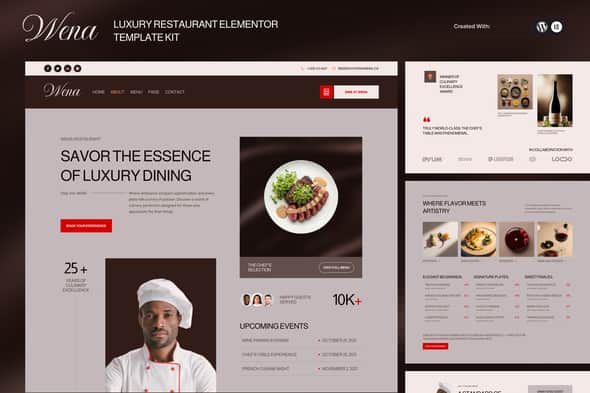
Wena – Luxury Restaurant Elementor Template Kit
Giá gốc là: 631.200₫.126.240₫Giá hiện tại là: 126.240₫.
Wena – Luxury Restaurant Elementor Template Kit
WENA is a premium Elementor Template Kit designed to bring a luxurious, refined, and modern dining experience to your restaurant’s online presence. Each layout is crafted with meticulous attention to detail—combining elegant typography, warm earthy tones, and smooth, high-end visual composition. With a clean and modular structure, WENA makes it effortless to showcase your menu, gallery, events, reservations, and brand story in a truly sophisticated manner.
Perfect for fine dining establishments, upscale cafés, bistros, and premium culinary brands looking for a visually stunning website without writing any code. Fully compatible with Elementor and built using drag-and-drop components, WENA ensures quick customisation and a seamless editing experience. This kit includes complete page content such as menu categories, about section, reviews, event schedules, image galleries, and reservation flow—ready to publish instantly.
Suitable For:
- Fine Dining Restaurant
- Modern Café & Bistro
- Luxury Culinary & Private Dining Service
Features
- Premium Modern & Elegant Design
- Fully Responsive & Mobile-Friendly Design
- Complete Content Structure for Restaurants
- Easy Customization with Elementor (No Coding Needed)
- Works with Most Elementor Themes
- Global Theme Style for Visual Consistency
Templates Include:
- Global Theme Style
- Home
- About Us
- Menu
- Menu Details
- Reservation Page
- Our Chefs
- Events
- Gallery
- Reviews
- Faqs
- Contact Us
- Blog
- Single Post
- Error 404
- Header
- Footer
- Reservation MetForm
- Newsletter MetForm
Required Plugins:
- Elementor
- Jeg Elementor Kit
- MetForm
How to Use Template Kits:
THIS IS NOT a WordPress Theme. Template Kits contain the design data for Elementor only and are installed using the Envato Elements plugin for WordPress or directly through Elementor.
Detailed Guide:
How to Upload & Install Template Kits
For further support, go to Elementor > Get Help in the WordPress menu.
How to Import Metforms:
If you have Elementor Pro, skip installing MetForm and form blocks.
- Import the MetForm block templates.
- Import the page template where the form appears and open the Navigator.
- Select the MetForm widget and click Edit Form. Choose New → Edit Form.
- Click the grey folder icon.
- Go to the My Templates tab.
- Select your imported MetForm template and click Insert (choose No for page settings).
- Customize the form as needed, then click Update & Close.
- Click Update on the page.
How to Setup Header with Jeg Elementor Kit:
If you have Elementor Pro, you can customize headers and footers via Theme Builder.
- Go to Jeg Elementor Kit > Header Template.
- Click Add New Header.
- Add Condition: All Site → Click Create.
- Click the grey folder icon to open My Templates.
- Insert the header template.
- Customize and save.
Image License:
This Template Kit uses demo images from Envato Elements. You will need to license these images from Envato Elements to use them on your website, or replace them with your own.
View Image Collection
Tặng 1 theme/plugin đối với đơn hàng trên 140k:
Flatsome, Elementor Pro, Yoast seo premium, Rank Math Pro, wp rocket, jnews, Newspaper, avada, WoodMart, xstore
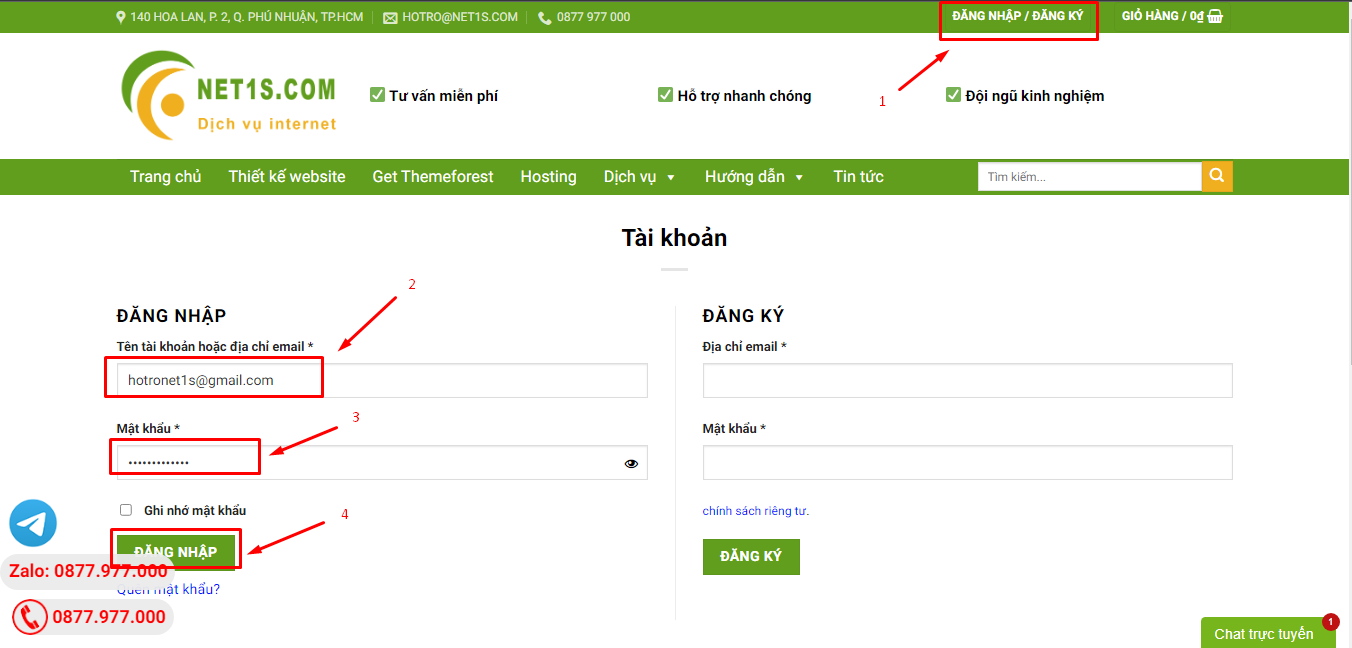
1. Bấm Đăng nhập/đăng ký.
2. Điền thông tin email, mật khẩu đã mua hàng -> bấm Đăng nhập.
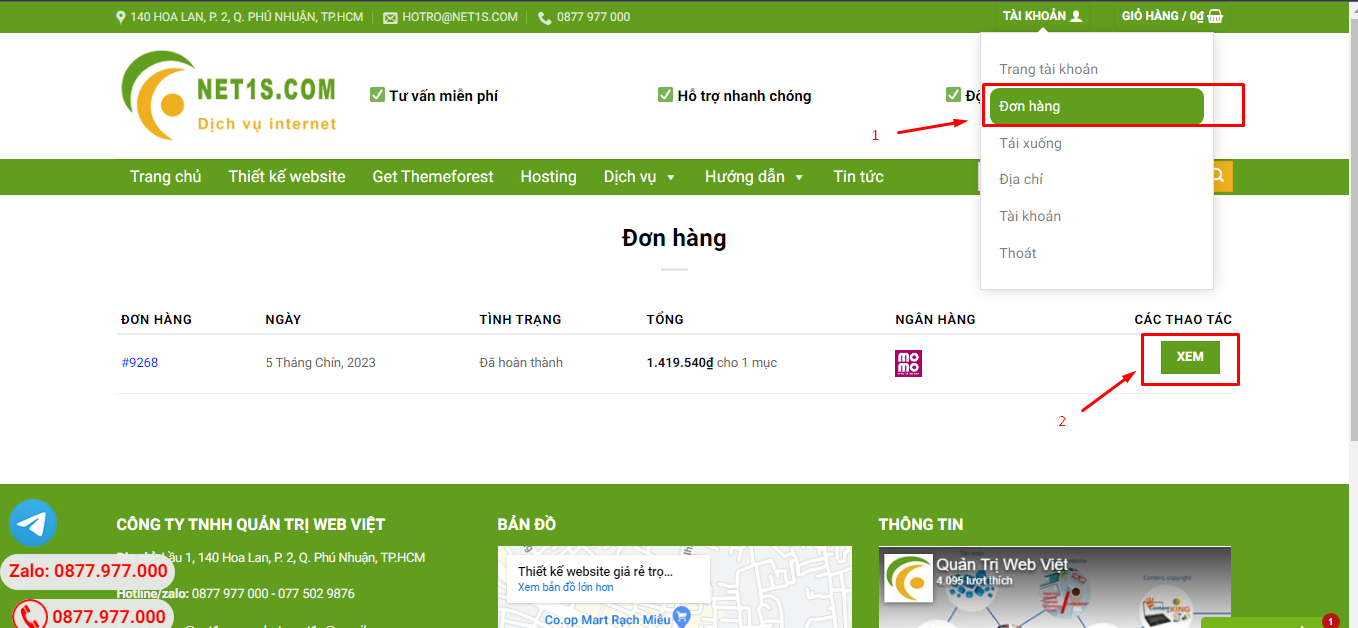
3. Di chuột đến mục Tài khoản -> Đơn hàng -> bấm vào Xem ở đơn hàng đã mua.
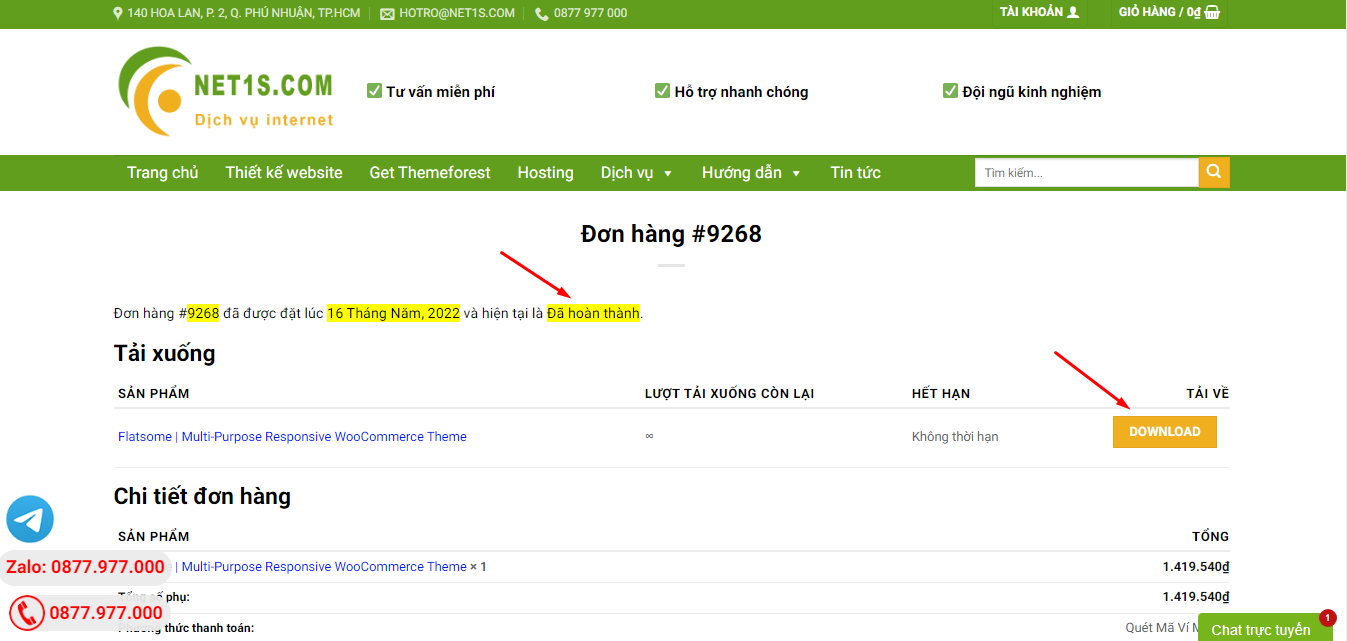
4. Đơn hàng hiển thị tình trạng Đã hoàn thành -> bấm vào Download để tải sản phẩm về.
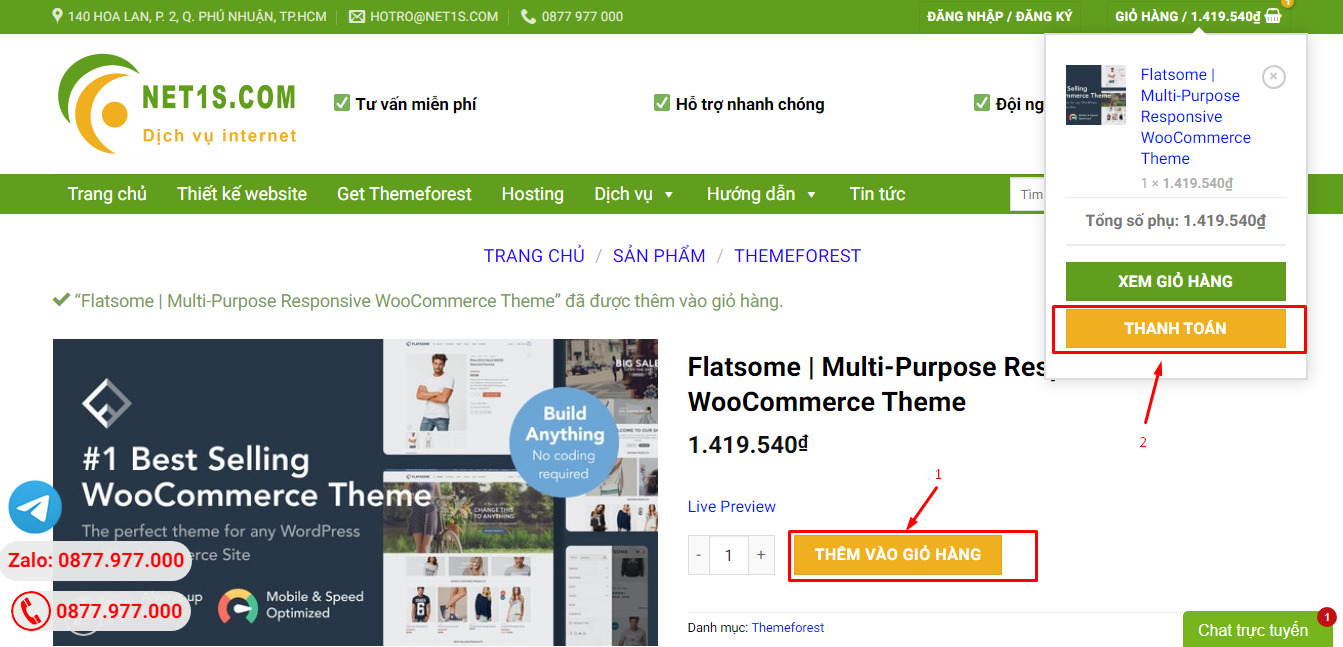
1. Bấm Thêm vào giỏ hàng -> bảng thông tin giỏ hàng sẽ hiển thị góc trên bên phải.
2. Bấm Thanh toán.
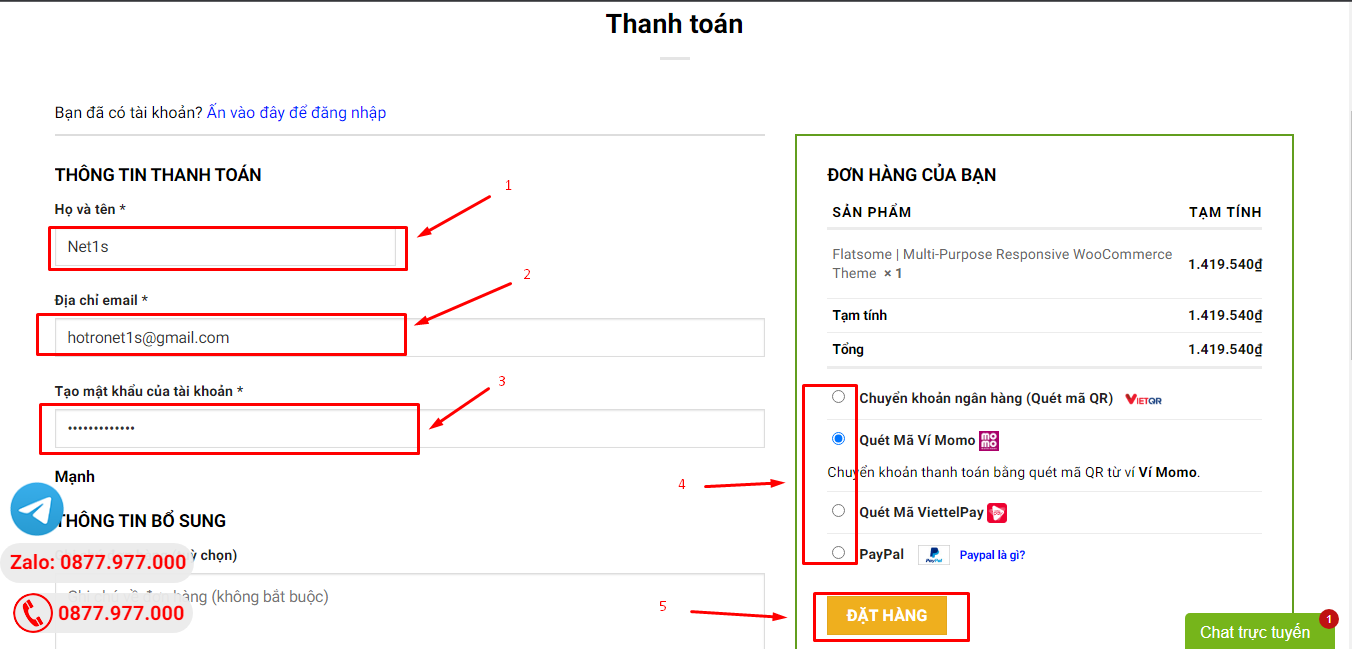
3. Điền thông tin thanh toán gồm: tên, email, mật khẩu.
4. Chọn phương thức thanh toán có hỗ trợ gồm: Chuyển khoản ngân hàng (quét mã QR), quét mã Momo, quét mã Viettelpay, Paypal.
5. Bấm Đặt hàng để tiếp tục.
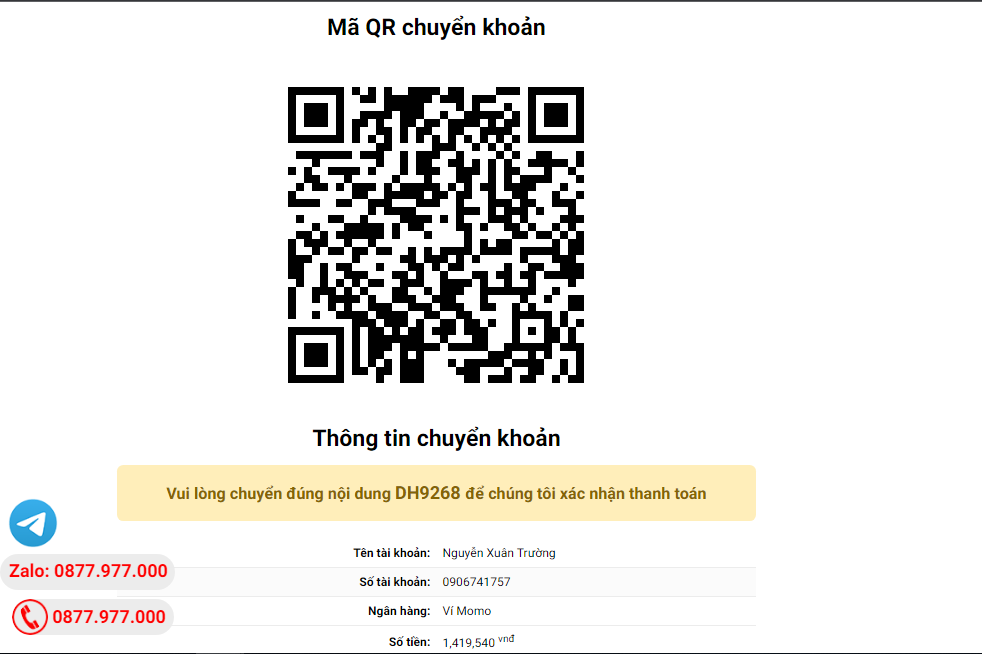
5. Thanh toán bằng cách quét mã QR (Nội dung chuyển khoản và số tiền sẽ tự động được tạo), hoặc chuyển khoản nhập số tiền và nội dung chuyển khoản như hướng dẫn.
6. Sau khi thanh toán xong đơn hàng sẽ được chúng tôi xác nhận đã hoàn thành và bạn có thể vào mục Đơn hàng để tải sản phẩm đã mua về.
Sản phẩm tương tự