Consl – Consulting Business Elementor Template Kit
Giá gốc là: 762.700₫.152.540₫Giá hiện tại là: 152.540₫.
Introduction
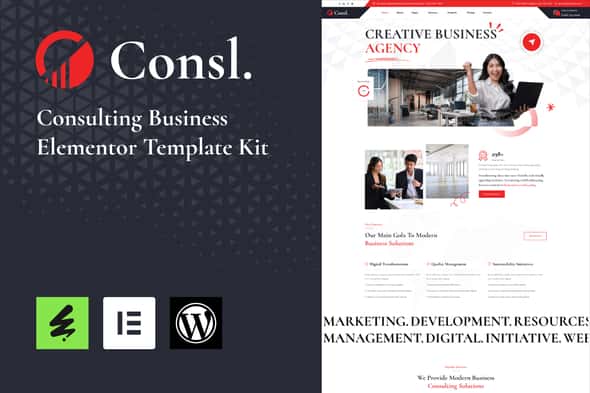
Consl – Consulting Business Elementor Template Kit is a sophisticated and versatile Template Kit designed specifically for consulting firms, advisory agencies, and professional services businesses. With its sleek and modern design, this theme combines functionality with aesthetics to create a powerful online presence for your consulting business.
Consl – Templates
Pages
- Home One
- About
- Serviecs
- Serviec details
- Pricing
- Team
- Team Single
- Projects
- Project Details
- FAQ
- Contact
- 404
- Header
- Footer
Sections
- Section – Header
- Section – Footer
- Contact Form
- Section – Hero
- Section – About
- Section – Portfolio
- Section – Features
- Section – Services
- Section – Fun Facts
- Section – Case Studies
- Section – Pricing
- Section – Company
- Section – FAQ
- Section – Testimonials
- Section – Contact
- Section – News Update Form
- Section – Contact Form
- Section – Contact Form 2
- Section – Team
Consl – Features
- 20+ Ready to use templates
- Modern Layout and Clean Design
- Built with Elementor Free Version (Pro is not required)
- 100% Responsive & Mobile-Friendly
- No Coding Knowledge Required
- Easy & Fully Customizable
- Cross Browser Compatibility: Chrome, Firefox, Safari, Opera
- and much more!
Required Plugins
- Elementor
- ElementsKit Lite
- Happy Elementor Addons
- Elextra Widgets for Elementor
- Sticky Header Effects for Elementor
- MetForm
How to Use Template Kits:
This is not a WordPress Theme. Template kits contain the design data for Elementor only and are installed using the envato Template Kit Import plugin for WordPress or directly through Elementor.
Detailed Guide:
https://help.market.envato.com/hc/en-us/articles/36033428836889-How-to-Upload-Install-Elementor-Template-Kits-from-Themeforest-to-WordPress
For further support, go to Elementor > Get Help in WordPress menu.
How to setup header in Jeg Elementor Kit plugin If you have Elementor Pro, setup headers and footers in Theme Builder. Pages you create with Elementor must have the Page Layout set to Elementor Full width for the global header and footer to appear.
- Go to Jeg Elementor Kit menu item > Header Template
- Click Add New Header
- Add condition > All Site and click Create
- Click the pencil icon to Edit and elementor will appear
- Click gray folder icon to access My Templates tab
- Insert the header template.
- Customize and Save.
How to Import MetForm Custom Form:
- While edititing a page where a form should appear, open the Elementor navigator to locate the Metform widget.
- Click Edit Form in the builder panel.
- Select New, leave blank selected then click Edit Form button.
- Click ‘Add Template’ grey folder button.
- Click ‘My Templates’ tab.
- Choose your imported MetForm template, then click ‘Insert’.
- Once the template is loaded, click ‘Update’.
This Template Kit uses demo images from Envato Elements. You will need to license these images from Envato Elements to use them on your website, or you can substitute them with your own.
- https://elements.envato.com/collections/CLB75XMA8H
Tặng 1 theme/plugin đối với đơn hàng trên 140k:
Flatsome, Elementor Pro, Yoast seo premium, Rank Math Pro, wp rocket, jnews, Newspaper, avada, WoodMart, xstore
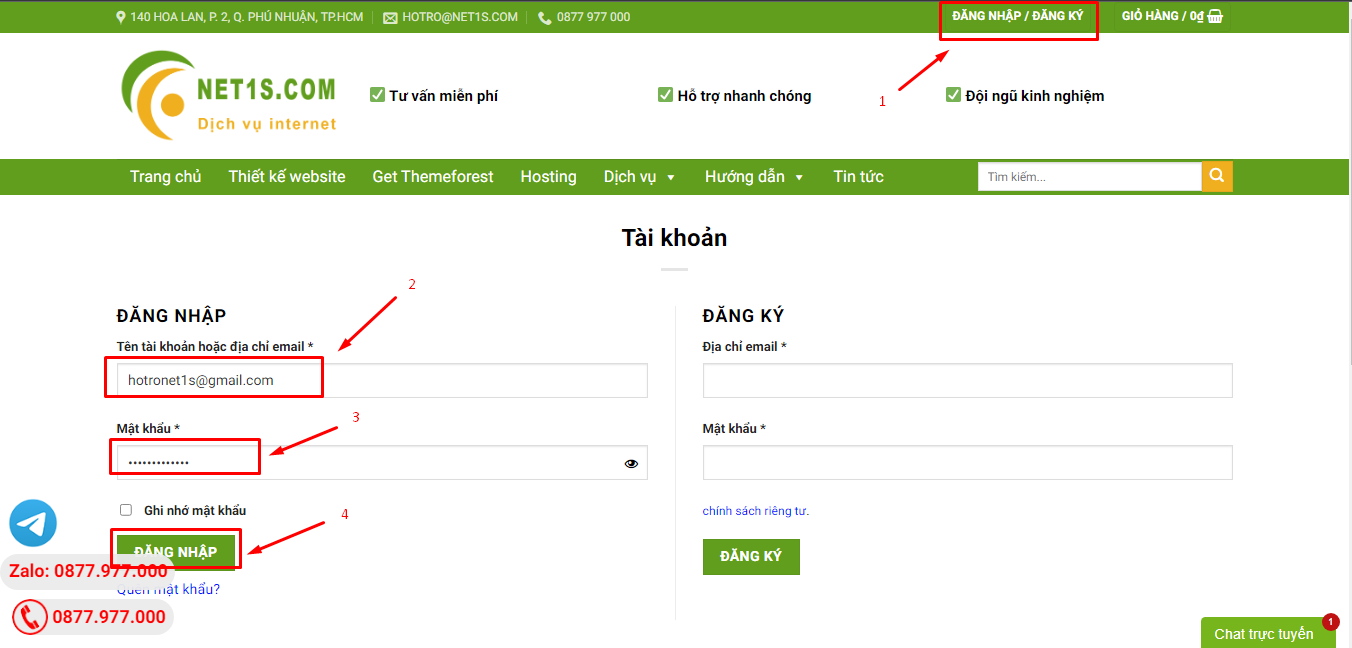
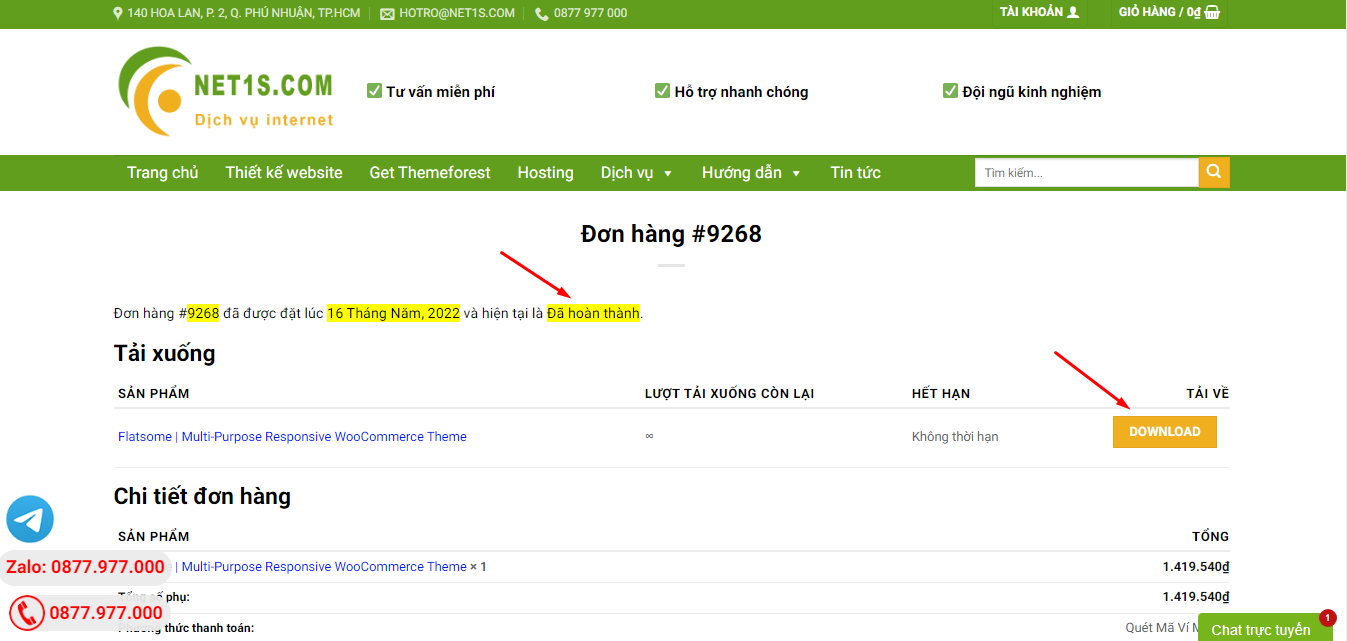
1. Bấm Đăng nhập/đăng ký.
2. Điền thông tin email, mật khẩu đã mua hàng -> bấm Đăng nhập.
3. Di chuột đến mục Tài khoản -> Đơn hàng -> bấm vào Xem ở đơn hàng đã mua.
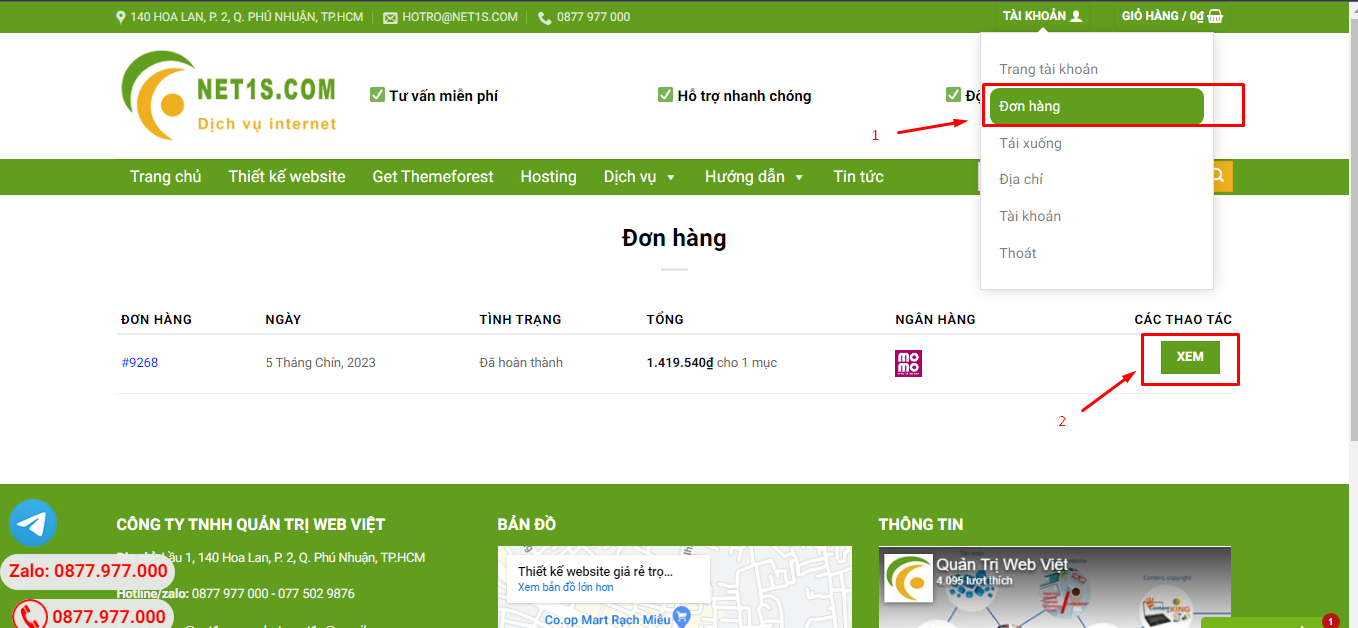
4. Đơn hàng hiển thị tình trạng Đã hoàn thành -> bấm vào Download để tải sản phẩm về.
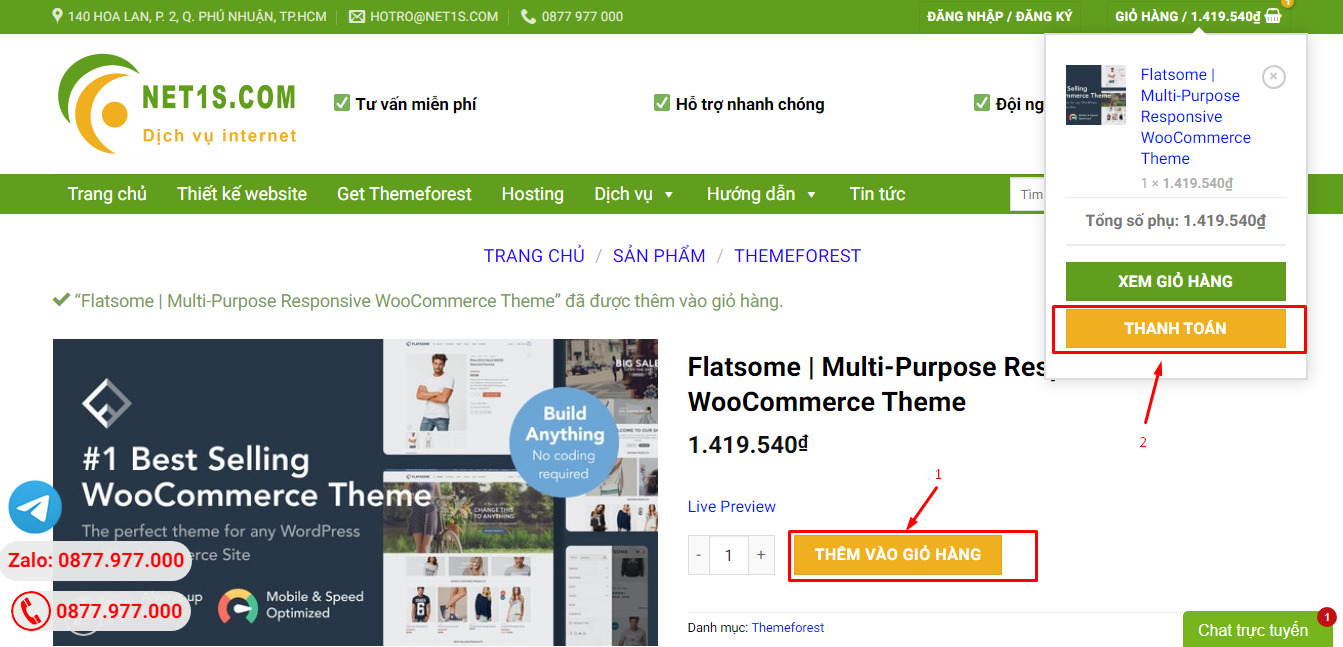
1. Bấm Thêm vào giỏ hàng -> bảng thông tin giỏ hàng sẽ hiển thị góc trên bên phải.
2. Bấm Thanh toán.
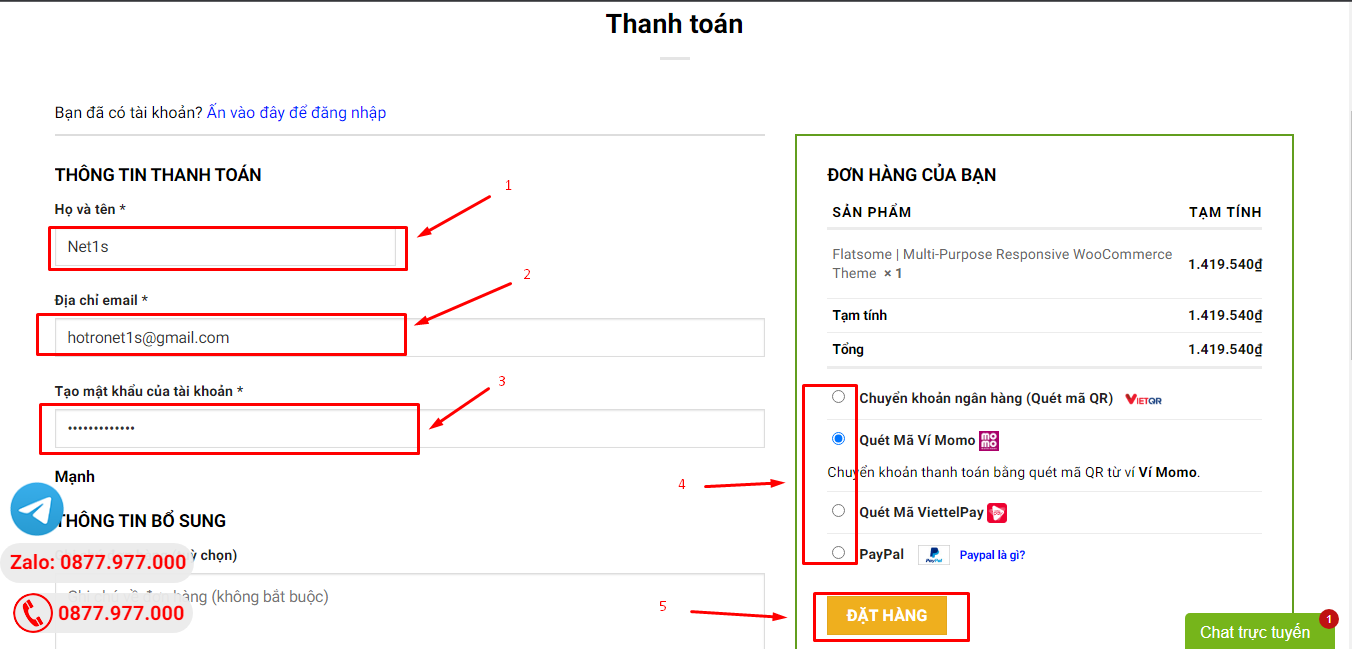
3. Điền thông tin thanh toán gồm: tên, email, mật khẩu.
4. Chọn phương thức thanh toán có hỗ trợ gồm: Chuyển khoản ngân hàng (quét mã QR), quét mã Momo, quét mã Viettelpay, Paypal.
5. Bấm Đặt hàng để tiếp tục.
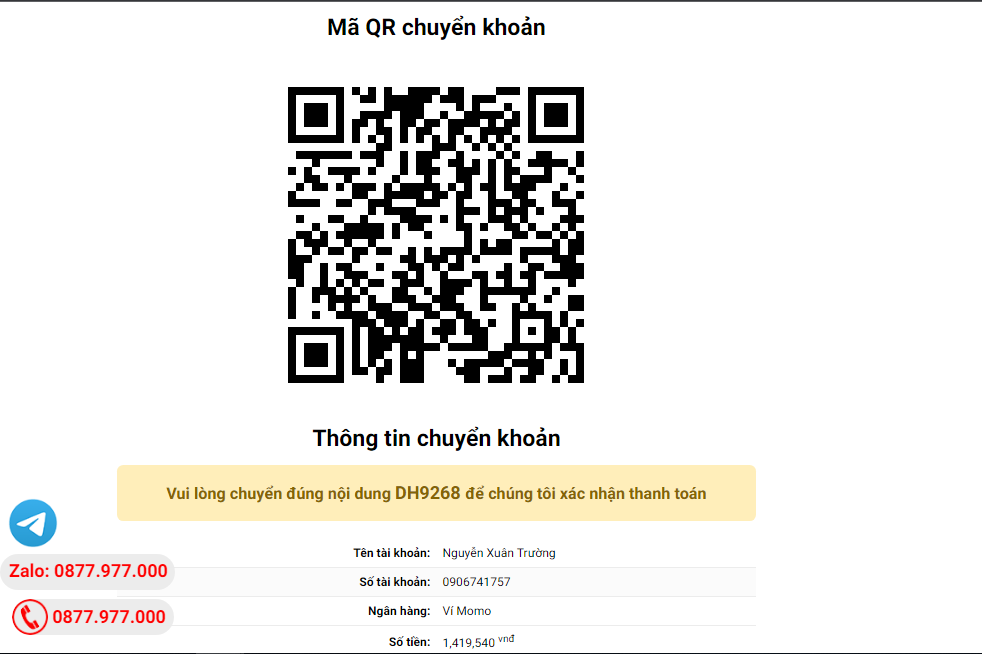
5. Thanh toán bằng cách quét mã QR (Nội dung chuyển khoản và số tiền sẽ tự động được tạo), hoặc chuyển khoản nhập số tiền và nội dung chuyển khoản như hướng dẫn.
6. Sau khi thanh toán xong đơn hàng sẽ được chúng tôi xác nhận đã hoàn thành và bạn có thể vào mục Đơn hàng để tải sản phẩm đã mua về.
Sản phẩm tương tự